


Gacha Life
4.5278.00K Reviews
App Specs
- Version
- Varies with Device
- Updated On
- License
- Free
- Downloads
- 100,000,000+
- Developer
- Lunime
- Categories
- Casual
- Platform
- Android, iOS
Screenshots


 Analysis by AppCompare
Ever found yourself in the mood to dive into a world where creativity meets anime-style customization? If yes, then let me introduce you to Gacha Life. This app is like a playground for those who love to express themselves through the creation of unique characters and engaging stories. I spent quite a bit of time tinkering with it, and here’s my take on the whole experience.
Why the First Week Feels So Inviting
What makes the opening stretch appealing is how quickly a small idea can turn into something you can see on screen. I might start with a character’s hairstyle or outfit, then build a personality around those choices and place them in a scene. That short loop—design, arrange, add dialogue—makes it easy to enjoy the game in spare moments without needing to plan a long session.
Gacha Life is a free casual game from Lunime, and it has the kind of low-pressure start that suits people who want to experiment rather than chase a demanding challenge. It is rated for Everyone, which makes its broad, playful presentation easy to understand, though parents should still decide whether its creative and community-related context suits their child. The game has a 4.5 average from around 3.9 million ratings, a sign that many players have found its mix of dress-up, play, and self-expression appealing.
Getting Started with Gacha Life
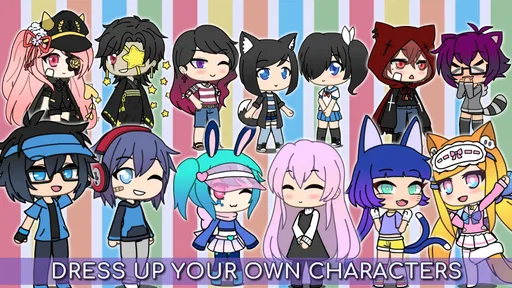
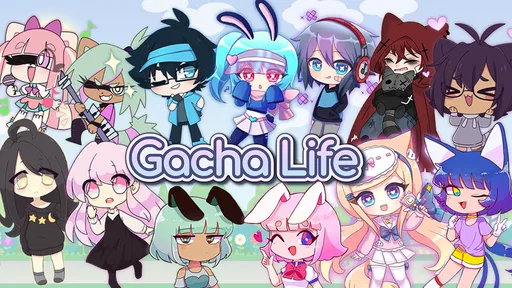
As soon as I launched Gacha Life, I was greeted by a colorful and welcoming interface. The app is pretty intuitive, which is great because I didn’t want to spend forever figuring things out. It’s all about getting straight to the fun, right? You start by creating your own anime-style character, and trust me, the customization options are endless. From hairdos to outfits, you can tweak just about anything to make your character truly yours.
One thing that caught my eye was the sheer variety of items available. We're talking everything from funky hats to magical swords. It’s like having a virtual closet that never ends! And yes, the app does offer in-game purchases, but I found plenty of free options to keep me entertained.
Making a Character Before Making a Story
A useful way to avoid getting lost in customization is to decide what the character is for before picking every detail. If I am building a cast for a short scene, I choose a few visual cues that make each person easy to recognize—perhaps a bold hairstyle for the lead and a contrasting outfit for a side character. That saves time later, because the audience can tell who is speaking even when the scene is busy.
The game’s free starting point is a genuine advantage for casual players: I can try the creative loop before spending anything. Optional purchases range from $1.99 to $19.99 per item, so I would treat them as extras rather than a requirement. A practical rule is to make a few characters and scenes with what is already available first; if a particular item would solve a specific creative problem, then it is easier to judge whether buying it is worthwhile.
Worth Reading Before You Choose

Flipboard Shows What News Apps Must Do Beyond the Feed

Switching to Android Auto Means Rethinking Your Driving Routine

Google Calendar Makes a Crowded Week Easier to Manage

Ludo King Makes the Most of the Minutes Between Plans

Baby Panda World Brings Quick Play to Modern Phones, but Its Game Library Feels Busy

ESPN’s Live Game View Makes Following Close Games Easier
Exploring the Studio and Skit Maker
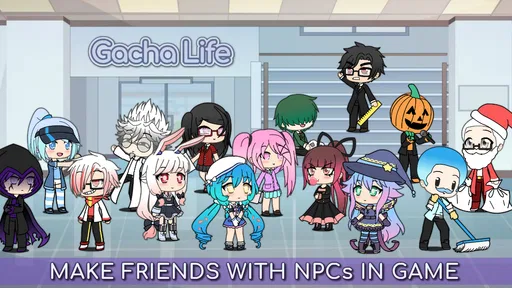
Now, once you’ve got your characters all dolled up, it’s time to put them into action. The Studio mode is where the magic happens. You can place your characters into different scenes and add text bubbles to create your own stories. It’s like directing your own little anime series. The Skit Maker feature takes it a notch higher, allowing you to script and narrate elaborate stories. It’s a bit like being a playwright but without the pressure!
I made a skit featuring a quirky detective and his sidekick, and boy, was it a blast! With a little imagination, you can create just about anything - from epic adventures to hilarious comedies.
A Small Workflow That Makes Scenes Easier to Finish
When I want a skit to feel coherent instead of becoming a pile of disconnected poses, I think through its beats before arranging the characters: who enters, what changes, and what the final joke or reveal is. I keep each scene focused on one action and use dialogue to carry the rest. That approach is especially helpful on a phone, where constantly adjusting a crowded composition can become tedious.
There is a trade-off here. The Studio encourages visual storytelling, but it is not the same as a full animation or video-editing tool. I would choose it for quick, stylized scenes and character interactions, not for precise motion, complex editing, or polished production. Players who mainly want to watch finished stories may get more immediate satisfaction from videos made by other fans; the game is more rewarding when you enjoy doing the arranging yourself.
Engage with the Gacha Life Community
One of the standout features of Gacha Life is its vibrant community. If you’re ever feeling stuck or in need of inspiration, there’s a whole world of user-generated content out there. From YouTube videos to fan art, people are sharing their Gacha creations everywhere. I even joined a few forums to swap tips and tricks with fellow Gacha enthusiasts. It’s a community that’s as welcoming as it is creative.
I see that community as an optional source of ideas rather than something required to enjoy the game. A player can keep character-making and scene-building as a private hobby, or use outside fan content to find prompts when inspiration runs dry. If a younger player explores videos or forums, I would keep that browsing separate from the game itself and use the usual age-appropriate supervision; community material is created by other people and can vary in tone.
Mini-Games and More
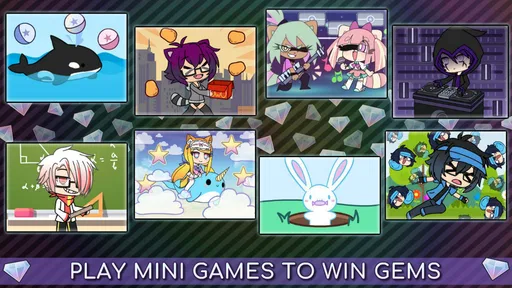
Now, if you’re in the mood for something different, Gacha Life has a selection of mini-games to keep you entertained. They’re simple yet addictive, offering a nice change of pace from the character creation and storytelling. My personal favorite was “Bex’s Festival,” where you can win gems and other goodies to use in the game.
These mini-games are a fun way to earn rewards and keep things fresh. Plus, they’re a great break when you need to recharge your creative juices before heading back into the Studio.
Keeping It in the Monthly Rotation
The question I ask after the first burst of novelty is whether I still have a reason to open the game when I am not actively inventing a story. For me, the answer depends on whether I have a small creative project in mind: a new character to test, a short exchange to stage, or a mini-game break. That gives the app recurring value without pretending it is a daily checklist or a competitive game that needs constant attention.
It also helps to set a modest goal instead of trying to use every mode in one sitting. I might make one character, save the idea for a scene, and return later to arrange the dialogue. That keeps a casual session satisfying and reduces the chance of spending an hour browsing choices without finishing anything. The game’s appeal is strongest when I treat it as a creative sketchbook, not a task list.
What Can Wear Thin, and What Takes Up Your Time
The same freedom that makes customization inviting can create decision fatigue. With so many possible looks and combinations, I can spend longer choosing details than developing the character’s voice. A simple constraint—two colors, one clear visual theme, or a limited cast—makes it easier to move from styling to storytelling. Players who prefer a clear campaign, frequent structured goals, or action that steadily changes may find the open-ended loop less compelling.
There is also a maintenance question: this is not an app I would keep opening just because it is installed. Its lasting value comes from returning with an idea, and it is perfectly reasonable to take breaks when I have none. The game was released on October 23, 2018, and runs on Android 5.0 or later. It has passed 100 million installs, but popularity alone does not make it the right fit for someone who wants a guided progression system or a more mechanically deep game.
Compared with many casual games built around quick rounds or a steady stream of objectives, Gacha Life puts more weight on making and arranging characters. That is its distinctive strength, but also the main reason to skip it if you want a conventional puzzle, platform, or action experience. If you enjoy creating scenes more than simply consuming them, the slower, self-directed pace can be a welcome change.
Final Thoughts
After spending some serious time with Gacha Life, I can confidently say it’s a gem for anyone who loves creativity and storytelling. The app offers a space where you can let your imagination run wild without the constraints of more traditional games. Whether you’re here to create, share, or just play around, Gacha Life has something for everyone.
So, if you're looking for an app that combines fun, creativity, and a dash of anime magic, give Gacha Life a try. Who knows? You might just create the next viral Gacha story!
Who I’d Recommend It To
I would recommend it to someone who likes dressing up characters, inventing personalities, and turning a quick idea into a visual scene. It can work well as a relaxed after-school or evening activity: make one character during a short break, then come back later to stage a conversation or try a mini-game. It is also a natural fit for people who enjoy making their own material more than following a fixed plot.
I would steer away from it if you need a strong sense of progression, a large world to explore through structured missions, or sophisticated tools for producing finished animation. The best choice depends on what you want from a casual game: Gacha Life is at its best when the fun is in making something yourself. If that sounds appealing, its free entry point makes it easy to see whether the creative routine sticks beyond the first week.
Pros
- Wide range of customization options.
- Engaging mini-games for quick fun.
- Creative storytelling possibilities.
- Active community sharing creations.
- Free to play with optional purchases.
Cons
- In-app purchases can add up.
- Graphics are basic and cartoonish.
- Some content may require moderation.
- Occasional ads disrupt gameplay.
- Limited offline functionality.
FAQs for Gacha Life
What is Gacha Life and how does it work?
Gacha Life is a popular role-playing game that allows users to create and customize anime-style characters. Players can dress up their characters with a variety of outfits, accessories, and hairstyles. The app also offers a Studio Mode where users can create scenes and stories, as well as mini-games for additional interaction. It's designed for creative expression and storytelling.
Is Gacha Life safe for children?
Gacha Life is generally considered safe for children, but parental guidance is recommended due to in-app purchases and the ability to interact with other users. The game's community guidelines encourage a positive environment, but as with any online platform, it's important to monitor interactions to ensure a safe experience.
Does Gacha Life require an internet connection?
Gacha Life can be played offline, which means you can customize characters and create scenes without an internet connection. However, certain features like updates, downloading new content, or interacting with the online community will require a connection. This makes it versatile for both online and offline play.
Are there in-app purchases in Gacha Life?
Yes, Gacha Life offers in-app purchases that allow players to enhance their gaming experience. These purchases can include special outfits, accessories, and other customization options. While the core game is free, these purchases can add up, so it's important for users to manage their spending, especially for younger players.
Can I play Gacha Life on multiple devices?
Gacha Life does not currently support cloud saving, which means your progress is stored locally on each device. If you wish to play on multiple devices, you will need to start from scratch on each one. It's advisable to backup your data manually if you switch devices often.


